15 Abandoned Cart SMS Templates That Actually Recover Sales
Every day, roughly 7 out of 10 shoppers who add a product to their cart on your Shopify store leave without buying. That’s not a guess — it’s the industry average. And for most small store owners, those abandoned carts just disappear into the void but they don’t have to.
A single text message, sent at the right time with the right words, can bring 10 to 20 percent of those shoppers back to complete their purchase. No ad spend. No complicated email sequence. Just a text.
In this post, you’ll get 15 copy-and-paste SMS templates organized by strategy, along with when to send each one and why it works. If you're using Matrucart, you can simply copy and paste these templates right into the Workflow Creation and be right on your way.
Why SMS Beats Email for Cart Recovery
Before we get into the templates, here’s why you should be texting your customers instead of (or in addition to) emailing them.
Email open rates for cart recovery campaigns hover around 20 percent. That means 8 out of 10 people never even see your message. And the ones who do open it? They might not get to it for hours or even days.
SMS open rates sit at 98 percent, and most texts are read within three minutes. When someone abandons a $50 cart at 2pm, a text at 2:30pm catches them while they still remember what they were looking at. An email at 6pm catches them after they’ve already moved on; or worse ... bought it somewhere else.
If you want a deeper breakdown of the two channels, read our full email vs SMS comparison for cart recovery.
3 Rules for a Cart Recovery Text That Converts
Every template below follows these three rules. Before you customize them, make sure your version does too.
Rule 1: Keep it under 160 characters. That’s one SMS segment. Go over, and your message gets split into two texts, which looks unprofessional and can cost you double on messaging fees. This will also cost you more credits.
Rule 2: Send it within 30 minutes. Research consistently shows that cart recovery messages sent within the first 30 minutes have the highest conversion rate. After an hour, your chances of recovering the sale drop by more than 50 percent. Speed matters more than perfection while the intent is hot. Though this is not a hard and fast rule and doesn't mean you can not send it after, it's good to remember that you want to nudge the shopper when the intent might be hot.
Rule 3: Sound like a human, not a brand. The best-performing cart recovery texts sound like a friend reminding you that you forgot something; not a marketing department trying to hit quota. Don't hit them with exlcamation points. No “EXCLUSIVE DEAL INSIDE!!!” Emojis are a nice add as they communicate friendliness! ✌️
Rule 4: Insert exciting text first! The last advice told you to not sound like a human. This one tells the opposite (so use sparingly) but if there's something you want the shopper to be particularly interested about, such as a discount or free shipping, start the message with that. Humans read in order and when the message sits in their inbox and can't see the full text, the part that will be visible will be the first few words. So if there is something you want to make apparent, make it the first few words!
Create a Recovery Workflow
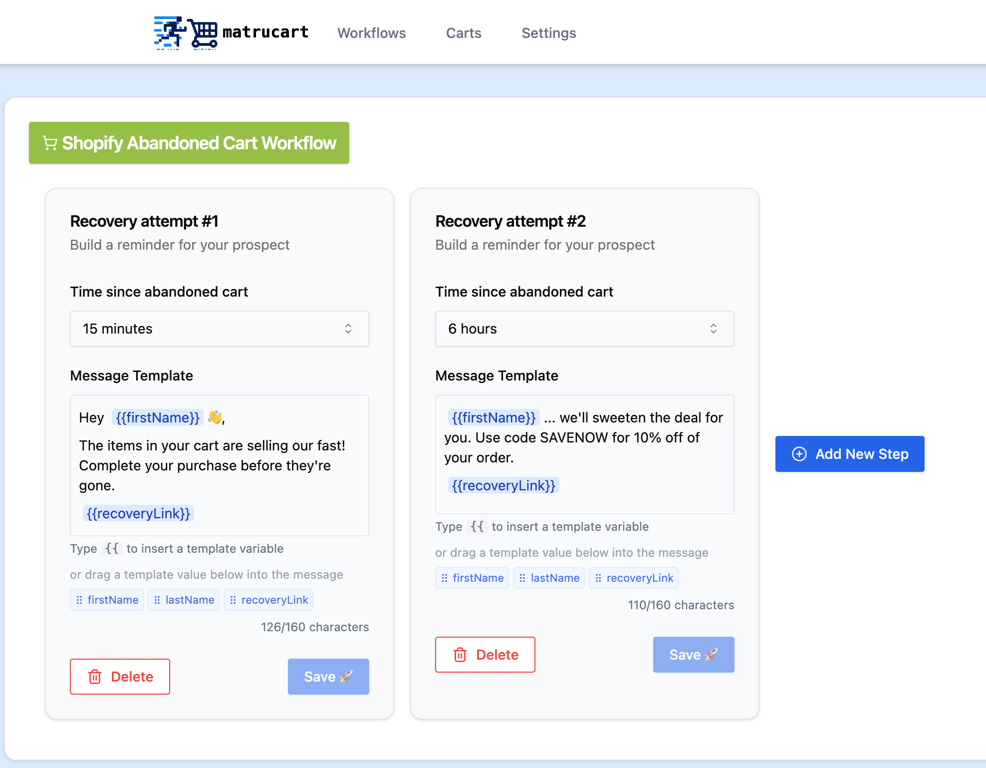
Matrucart enable you to create a workflow which is a series of messages that are sent after the time you specify. Below is a screenshot on how to create a workflow. You can use ready-made copy and paste templates below to setup the workflow that suits your strategy the best.
15 Abandoned Cart SMS Templates (Organized by Strategy)
The Simple Reminder (Templates 1–3)
These are your bread and butter. Low pressure, high performance. Best for first-time visitors who got distracted.
Template 1 — The Friendly Nudge
Hey {{first_name}}! You left something in your cart. Your order is saved here: {{recovery_link}}
Template 2 — The Casual Check-In
Hi {{first_name}}, just checking 👋 did you mean to leave items in your cart? We saved them for you: {{recovery_link}}
Template 3 — The Straightforward One
You left some goods in your cart. Finish your order here: {{recovery_link}}
The Soft Urgency (Templates 4–6)
These create a gentle sense of “act now” without being manipulative. Best for stores with limited inventory or popular products.
Template 4 — The “For Now” Save
Still thinking about it? Your cart at saved for now until supplies last: {{recovery_link}}
Template 5 — The Stock Reminder
Heads up — your item is selling fast. Your cart is still waiting: {{recovery_link}}
Best sent at: 1–2 hours · Why it works: If the product actually does sell well, this is honest and effective. Don’t use this if your product has unlimited stock — people can tell when scarcity is fake.
Template 6 — The Cart Expiration
Hey {{first_name}}, your cart will expire soon. Complete your order: {{recovery_link}}
92 characters · Best sent at: 2–4 hours · Why it works: Most Shopify carts do expire after a set period, so this is factually accurate. It turns a platform limitation into a conversion trigger.
The Social Proof Play (Templates 7–9)
Leverage what other customers are doing to validate the purchase decision. Best for trending products, fashion, and lifestyle brands.
Template 7 — The Popularity Signal
The item in your cart is one of our most popular items right now. Don’t miss yours: {{recovery_link}}
Template 8 — The Review Hook
Our customers love what you've added in your cart (4.8 stars). Don't forget about it: {{recovery_link}}
Template 9 — The “Others Are Buying” Signal
[X] people bought wha you have in your cart this week. Still want yours? {{recovery_link}}
The Discount Offer (Templates 10–12)
Use sparingly. Discounts work, but they train customers to expect them. Best reserved for high-value carts or as a second message after the initial reminder gets no response. However, if you’re a small store just trying to close the sale and can forgo a cut into your margin, this is a effective way to close the deal.
Template 10 — The Straightforward Discount
Still interested? Here’s [X]% off your cart. Use code [CODE] at checkout: {{recovery_link}}
Template 11 — The Free Shipping Offer
Your cart is eligible for free shipping. Complete your order: {{recovery_link}}
79 characters · Best sent at: 4–6 hours · Why it works: Free shipping often converts better than a percentage discount because shipping costs are the single biggest reason for cart abandonment. If your margins allow it, this is more effective than 10% off.
Template 12 — The Time-Limited Offer
[First Name], we’re holding your cart + a [X]% discount for the next 24 hours: [Link]
For a full article on effective strategies on including a Promo Code in an Abandoned Cart Sequence, see this blog post.
The Personal Touch (Templates 13–15)
Maximum conversion, but requires dynamic personalization data from your SMS tool. Best for repeat customers and high-AOV products.
Template 13 — The Product-Specific Follow-Up
Hey [First Name], the [Product Name] in [Color/Size] is still in your cart. Want to grab it? [Link]
101 characters · Best sent at: 30–60 minutes · Why it works: The specificity signals that this isn’t a mass blast. Mentioning color or size shows you know exactly what they were shopping for.
Template 14 — The Returning Customer
Welcome back, [First Name]! Looks like you left something behind this time. Finish up here: [Link]
100 characters · Best sent at: 30 minutes · Why it works: Acknowledging they’re a returning customer builds on existing trust. These recover at higher rates than first-time visitor messages.
Template 15 — The Human-Sounding Text
Hey! Noticed you didn’t finish checking out. No rush at all … your stuff is saved if you want it: [Link]
106 characters · Best sent at: 30–45 minutes · Why it works: This reads like a text from a person, not a brand. The “no rush at all” is counterintuitive for a sales message, but it works because it drops the customer’s guard. They don’t feel sold to.
And of course, if you’re really trying to push them to close the deal, hang a carrot for them and give them a Promo Code.
How to Send These Automatically on Shopify
You don’t have to sit at your computer and manually text customers when they abandon a cart. SMS cart recovery tools automate this entire workflow.
Here’s what happens behind the scenes: a customer adds a product to their cart, leaves your store without completing checkout, and your SMS tool detects the abandonment and automatically sends whichever template you’ve configured — usually within 30 minutes.
The customer gets a text, taps the link, lands back in their cart with everything still there, and completes the order.
Setting this up takes a few minutes. You need SMS consent enabled in your Shopify checkout settings (Settings → Checkout → Marketing consent — make sure SMS is turned on), and a cart recovery tool connected to your store.
For a full walkthrough, check out our step-by-step setup guide for Shopify SMS cart recovery.
Tools like Matrucart are built specifically for this — affordable SMS cart recovery for solo Shopify store owners who don’t need (or want to pay for) enterprise-level platforms.
Frequently Asked Questions
Is it legal to send abandoned cart text messages?
Yes, as long as the customer has opted in to receive SMS marketing from your store. Shopify has a built-in SMS consent checkbox at checkout — make sure it’s enabled. You also need to comply with TCPA regulations and register for 10DLC if you’re sending messages in the US. Matrucart handles this for you.
How many cart recovery texts should I send?
No more than two per abandoned cart. A first message at 30 minutes and an optional follow-up at 4-6 hours is the standard. Anything beyond that risks annoying the customer and increasing your unsubscribe rate.
What’s a good abandoned cart recovery rate?
Industry benchmarks put average SMS cart recovery rates at 10 to 15 percent. Well-optimized campaigns with personalized messaging can reach 20 percent or higher. Even recovering 10 percent of your abandoned carts can add meaningful revenue if your average order value is $30 or more.
Do I need a customer’s phone number to send a recovery text?
Yes. The customer must have provided their phone number and opted in to SMS marketing during checkout. This is why enabling SMS consent in your Shopify checkout settings is so critical — without it, you won’t collect the phone numbers you need.
Should I offer a discount in my cart recovery text?
Not as your first message. Lead with a simple reminder — most people abandoned because of distraction, not price. If they don’t come back after the first text, you can follow up with a small discount (5-10 percent or free shipping) as a second touch. Offering discounts too early trains customers to abandon their cart on purpose and wait for a deal. However, if you’re an early brand trying to establish rapport and are okay with cutting into your margin, this may be okay!
What’s the best time to send an abandoned cart text?
Within 30 minutes of the abandonment. This catches the customer while their purchase intent is still high. After 60 minutes, recovery rates drop significantly. The second-best option is within 1 to 2 hours if 30 minutes isn’t possible with your tool.
Ready to start recovering abandoned carts? Matrucart gives you automated SMS cart recovery built for solo Shopify store owners — set up in 3 minutes, priced for stores that aren’t doing millions yet.

👻 Don't Let Abandoned Carts Haunt Your Store This Halloween: Recover Sales with SMS Reminders
This Halloween, don't let abandoned carts haunt your store. Consider strategies to re-engage with shoppers via SMS!
Read Full Story
Email vs SMS for Abandoned Cart Recovery: Which is better for your small Shopify store?
Does your Small Shopify store need email or SMS for cart recovery?
Read Full Story
The Real Cost of Abandoned Carts for Small E-commerce Stores
See how much more revenue you could possibly make if you start recovering abandoned carts.
Read Full Story